Resources
Use Kitsch Labs character TTS in RisuAI
Connect Kitsch Labs voices to RisuAI with an OpenAI-compatible endpoint. Follow screenshots for API keys and voice IDs, then compare free credits and estimated dialogue turns.
Connect Kitsch Labs TTS to your RisuAI character chats and give your character a voice worth listening to. With character voices designed for animation, character chat, and other fandom-inspired experiences, Kitsch Labs brings more personality and immersion to your conversations.
Setup takes about five minutes, and you can try it for free without making a payment!
1. Prepare your Kitsch Labs API key and Voice ID
Create an API key
- Sign in to Kitsch Labs.
- Open Developer → API keys in the sidebar, or go directly to API key management.
- Select Add key.
- Enter a name. Use
RisuAIto make the key easy to recognize later. - Copy the issued API key and keep it somewhere safe.
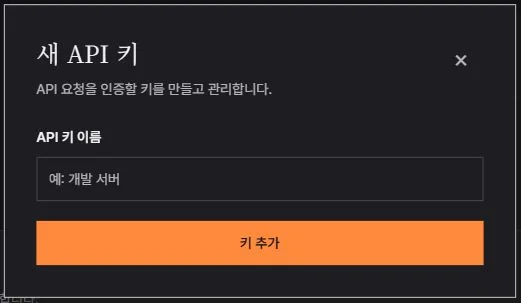
Your API key authorizes use of your account, so do not share it. Mask it when taking screenshots of your settings.
Choose a voice and copy its Voice ID
Preview voices on the Kitsch Labs home page and choose one that suits your character. Select the copy button at the top right of the character card to copy its Voice ID.
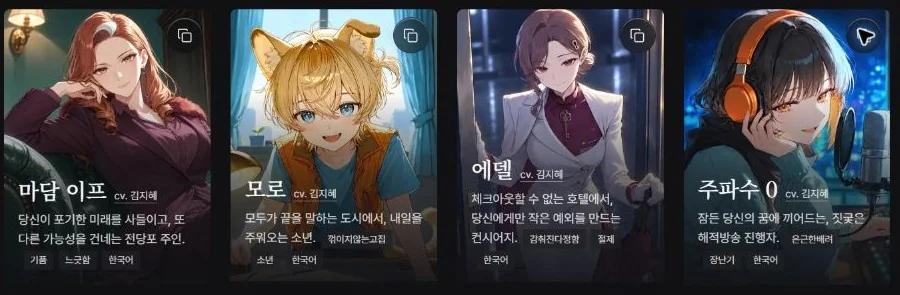
You will paste this value into RisuAI’s Voice field. Use the ID rather than the character’s Korean display name. For example, the voice labeled 주파수 0 has the ID unlisted-frq.
2. Connect it to RisuAI
Open the character you want to configure in RisuAI, then select the speaker icon (TTS) in the character settings.
Choose OpenAI as the provider and check Advanced (OpenAI-compatible endpoint). Although the provider is called OpenAI, entering the address below sends speech synthesis requests to Kitsch Labs.
| Setting | Value |
|---|---|
| Provider | OpenAI |
| Voice | The Kitsch Labs Voice ID copied from the home page |
| Advanced (OpenAI-compatible endpoint) | Checked |
| Base URL | https://api.kitschlabs.com/v1 |
| API Key (overrides global) | Your Kitsch Labs API key |
| Model | kitsch-voice |
| Response Format | mp3 |
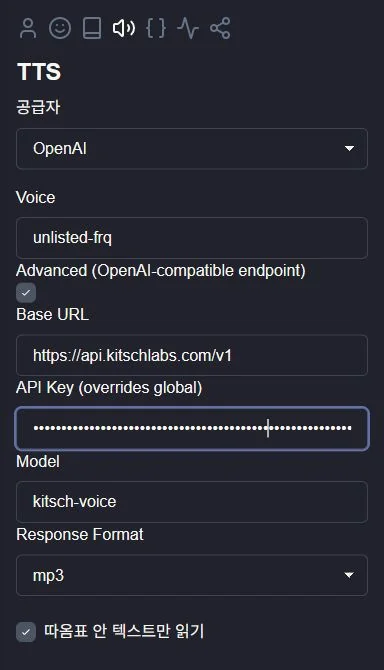
The screenshot uses unlisted-frq, the Voice ID for 주파수 0.
Replace the default alloy and tts-1 values. Enter your copied Kitsch Labs Voice ID in Voice and kitsch-voice in Model.
Do not leave API Key empty. RisuAI may otherwise use its global OpenAI API key, so enter the key you created in Kitsch Labs here.
3. Play a line of dialogue
Start with a short reply to check the connection. Ask your character the following, then select the speaker icon beside the reply.
Give me a short greeting inside quotation marks.
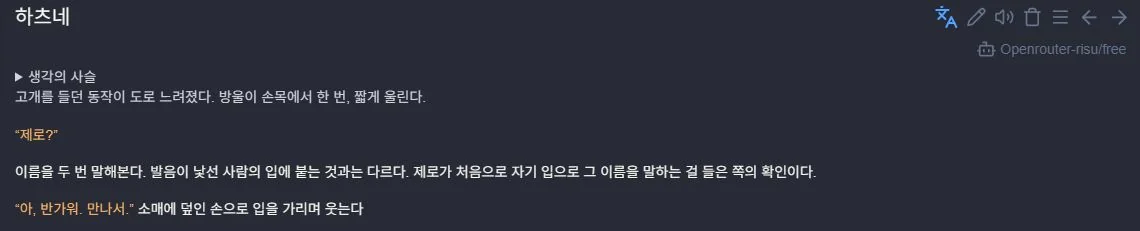
If the reply includes descriptions of expressions or actions, enable the option to read only text inside quotation marks in the TTS settings. In the Korean interface shown here, it is labeled 따옴표 안 텍스트만 읽기. Reading only the spoken dialogue can make playback shorter and the conversation more immersive.
4. If you cannot hear any speech
First, check that API Key contains your Kitsch Labs key without extra spaces. Voice must contain a Voice ID rather than the character’s name. Copy it again with the button at the top right of the character’s Kitsch Labs home-page card.
Also check the address and model name:
Base URL: https://api.kitschlabs.com/v1
Model: kitsch-voice
The Base URL must end in /v1. Do not append /audio/speech.
Start with mp3 as the Response Format. Kitsch Labs does not support every format in RisuAI’s dropdown. The Speech API supports mp3, wav, and pcm. Supported formats
Check your remaining credits in Kitsch Labs Usage and Billing, and make sure your workspace can use the selected voice.
If the settings are correct but playback is silent, check:
- Whether Chrome’s tab or your device is muted.
- Whether the reply contains quoted dialogue when the quotation-only option is enabled.
- Whether you selected the speaker icon beside the character’s reply.
5. Free allowance and pricing
The Kitsch Labs Free plan is for non-commercial use and includes 450 credits each month. Plan details
The speech synthesis API connected to RisuAI uses 90 credits per minute of generated audio. Each request’s generated duration is rounded up to a whole second for billing. There is no fixed charge per input character or chat turn. API billing
Using all 450 credits for TTS API requests gives about five minutes of speech.
The table assumes one character reply per turn and 10 seconds of audio per reply.
| Plan | Regular monthly price | Monthly credits | API speech | Estimated turns |
|---|---|---|---|---|
| Free | Free | 450 | About 5 min | About 30 |
| Starter | KRW 5,000 | 3,600 | About 40 min | About 240 |
| Standard | KRW 15,000 | 10,350 | About 115 min | About 690 |
| Standard Plus | KRW 30,000 | 20,700 | About 230 min | About 1,380 |
| Pro | KRW 150,000 | 108,000 | About 1,200 min | About 7,200 |
Generated speech takes up only part of the time you spend chatting. We recommend starting with Starter for occasional character chats, or Standard if you chat more often.
First-month discounts of 50% on eligible plans and annual billing discounts are also available, so check the current offers!
Kitsch Labs adds new animation-style character voices each month. If you have not found your favorite yet, follow Kitsch Labs on Instagram for announcements when new voices arrive.
If there is a particular voice you would like, you can also request it through Contact us.
That is how to connect Kitsch Labs character TTS to RisuAI. Enjoy hearing your character’s next line!